
Distributed Job SchedulingBuilt for Scale
Separate your scheduler from workers. Scale independently. Monitor everything. Milvaion is the open-source distributed job scheduling system for .NET, and it plugs straight into the Hangfire and Quartz.NET jobs you are already running, so you can start with visibility and migrate later. Or never.
00 Three commands to a running cluster
You already have Hangfire.You just can't see it.
Background jobs scattered across a dozen services, each with its own dashboard, its own retention window and no shared history. Milvaion plugs into the Hangfire and Quartz.NET you are already running and pulls all of it into a single view — without touching a line of job code.
12 services. 12 dashboards.
Zero shared history.
One dashboard.
Every job, every scheduler.
Keep your scheduler
Hangfire and Quartz.NET keep owning your triggers, storage and cron. Nothing about your job code changes.
Add two lines
One NuGet package and two service registrations per application. No rewrite, no migration window, no risk.
See everything
Every job across every service shows up in one real-time dashboard with execution history, logs, metrics and alerts.
// Your existing Hangfire setup stays exactly as it is builder.Services.AddMilvaionHangfireIntegration(builder.Configuration);builder.Services.AddHangfire((sp, config) => config.UseMilvaion(sp));
dotnet add package Milvasoft.Milvaion.Sdk.Worker.HangfireJobs from external schedulers appear in the dashboard flagged as external. Milvaion observes them; it never takes over their triggers.
Weighing it up? Milvaion vs Hangfire · Milvaion vs Quartz.NET · One dashboard across services
What you get on day one
- Unified dashboard across every service and scheduler
- Full execution history persisted in PostgreSQL
- Real-time logs streamed while jobs are running
- Multi-channel alerting on failures and timeouts
- Success rate, duration and EPM metrics per job
- Prometheus, Grafana and OpenTelemetry out of the box
Later, when a job outgrows in-process execution, move just that one job to a Milvaion worker. Everything else keeps running untouched.
Read the integration guide02 Features
EverythingYou Need
A complete job scheduling platform with enterprise-grade features, built from the ground up for distributed systems.
Keep scrolling
Cron Scheduling
6-field cron expressions with second-level precision. Schedule jobs from every second to once a year.
Distributed Architecture
Separate scheduler (API) from workers. Scale each independently based on workload demands.
retry backoff
Reliability Built-In
Exponential backoff retries, Dead Letter Queue, zombie detection, and auto-disable for failing jobs.
Real-Time Dashboard
Beautiful UI powered by SignalR. Monitor jobs, workers, and executions in real-time.
Enterprise Management
User, role & permission management with granular access control. User activity tracking and audit logs. Built-in metric reports for job health, performance, and system diagnostics.
SSO & Directory
Single sign-on through any OpenID Connect provider (Keycloak, Entra ID, Okta) and direct LDAP/Active Directory bind. Users are provisioned just-in-time while permissions stay owned in Milvaion.
Multi-Channel Alerting
Google Chat, Slack, Microsoft Teams, Email, and internal notifications with configurable routing.
Graceful Shutdown
Workers complete in-progress jobs before shutting down. Offline resilience with SQLite fallback.
OpenTelemetry
Built-in Prometheus metrics, distributed tracing, and pre-configured Grafana dashboards.
worker replicas
Auto-Scaling
Kubernetes HPA, KEDA queue-based scaling, and concurrency policies per job type.
Built-In Workers
HTTP, SQL, Email, and Maintenance workers out of the box. No code required for common tasks.
External Schedulers
Integrate Quartz.NET or Hangfire. Keep your scheduler, add Milvaion monitoring and dashboards.
Workflow Pipelines
Chain jobs into DAG-based workflows with conditional branching, data mappings, merge nodes, and automatic orchestration.
How MilvaionWorks
Schedule
API Server
Dispatch
RabbitMQ
Execute
Workers
Monitor
Dashboard
Schedule
API Server
Create jobs with cron expressions via API or Dashboard. Jobs are stored in Redis ZSET sorted by next fire time.
Zero-CodeWorkers
HTTP Worker
Make REST API calls, send webhooks, monitor health endpoints. Supports all HTTP methods, auth types, retry policies, proxy, and mTLS.
{
  "method": "POST",
  "url": "https://api.example.com/notify",
  "headers": { "Authorization": "Bearer {{token}}" },
  "body": { "message": "Job completed" },
  "expectedStatusCode": 200,
  "retryCount": 3
}SQL Worker
Execute queries across PostgreSQL, SQL Server, and MySQL. Parameterized queries, stored procedures, and transactions.
{
  "connectionAlias": "reporting-db",
  "commandType": "Text",
  "commandText": "SELECT cleanup_old_records($1)",
  "parameters": [
    { "name": "$1", "value": "30" }
  ]
}Email Worker
Send emails via SMTP with HTML/plain text, attachments, CC/BCC, priority levels, and multiple SMTP configurations.
{
  "smtpConfigName": "transactional",
  "to": ["user@example.com"],
  "subject": "Report Ready",
  "isHtml": true,
  "body": "<h1>Your report is ready</h1>",
  "priority": "High"
}Maintenance Worker
Automated Milvaion's database maintenance, execution retention, failed execution cleanup, Redis cleanup, and archival.
// Built-in maintenance jobs:
• DatabaseMaintenance - VACUUM, ANALYZE
• OccurrenceRetention - Delete old records
• FailedOccurrenceCleanup - Purge resolved
• RedisCleanup - Remove stale keys
• OccurrenceArchive - Archive to cold store
DAG-BasedJob Pipelines
Visual Workflow Builder
Drag-and-drop nodes, connect edges, configure steps — all from the portal UI.
Node Types
Dispatches a scheduled job. The primary building block of every workflow.
Evaluates an expression and routes execution through true or false ports.
Waits for all incoming branches to complete before continuing downstream.
// Step 1 (ExtractPrices) result:
{ "price": 99, "item": { "name": "Widget" } }

// Mapping on Step 2:
step1:price → amount
step1:item.name → title

// Step 2 (SendInvoice) receives:
{ "amount": 99, "title": "Widget" }
Data Mappings
Pass output fields from upstream steps into downstream job data. Schema-assisted with dot-path notation and wildcard support.
Step Delays
Add configurable delays between steps. Wait seconds after dependencies complete before dispatching.
Automatic Retries
Configure max step retries. Failed steps are retried automatically before marking as failed.
Failure Strategies
Stop on first failure or continue independent branches. Choose the right strategy per workflow.
Cron & Manual Triggers
Schedule workflows with 6-field cron expressions or trigger manually via API and portal.
Versioning & History
Every save creates a new version. Compare historical runs against the workflow definition they executed.
BeautifulReal-Time UI
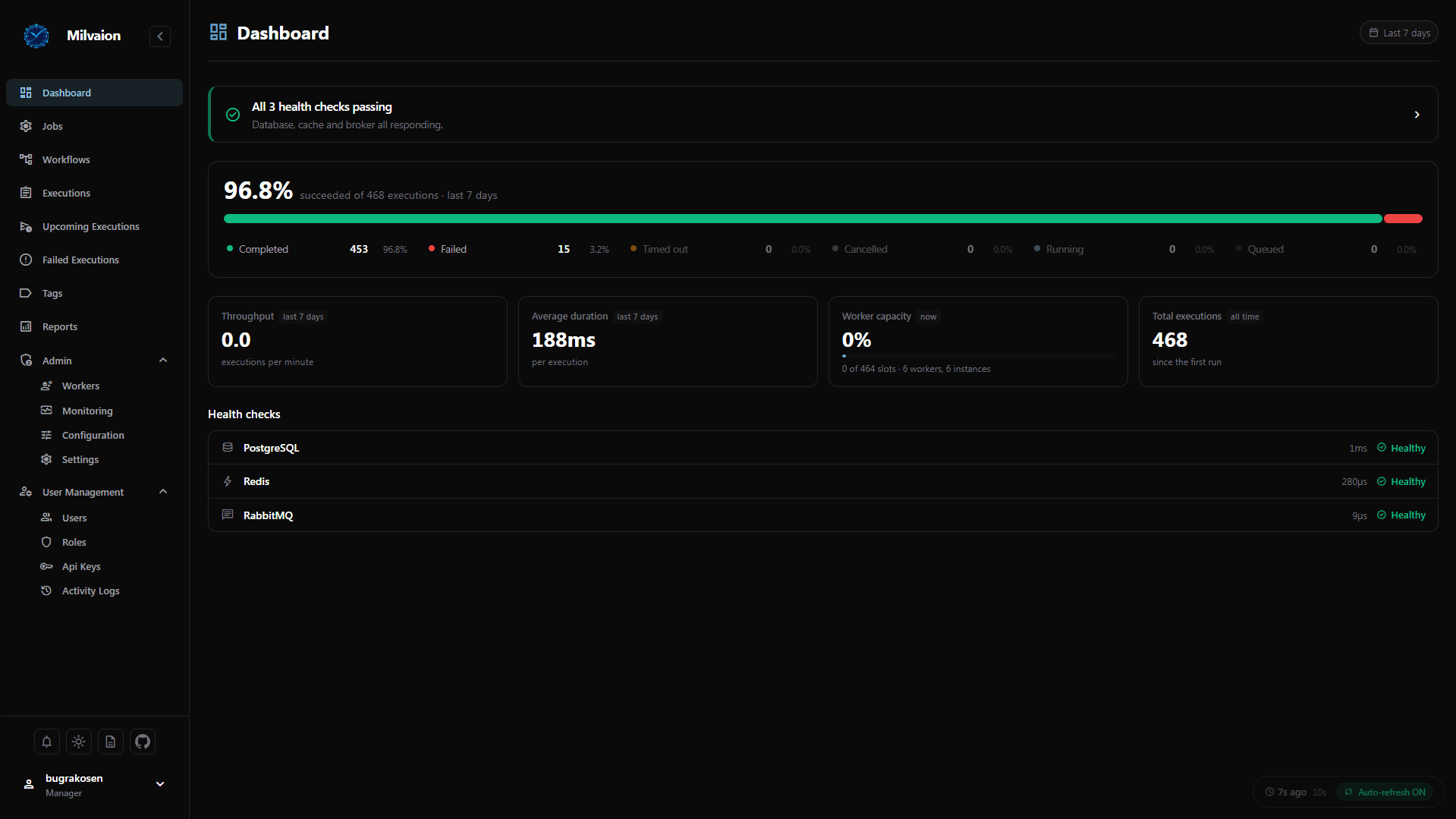
Dashboard Overview
Real-time metrics: total executions, success rate, active workers, capacity utilization, and EPM.
Ask your schedulerin plain language
{
  "mcpServers": {
    "milvaion": {
      "type": "http",
      "url": "https://milvaion.acme.com/mcp",
      "headers": { "X-ApiKey": "..." }
    }
  }
}
15 reading tools
Jobs, executions, logs, dead letter failures, workers, workflows, runs and the activity log.
17 acting tools
Trigger, cancel, pause, create, edit and delete — each behind its own permission.
Your key decides
Grant only List and Detail and the assistant can investigate everything and change nothing.
Things people actually ask it:
WhyMilvaion?
| Feature | Milvaion | Hangfire | Quartz.NET |
|---|---|---|---|
| Architecture | Distributed | Monolithic | Embedded |
| Job execution | Separate processes | In-process | In-process |
| Job dispatch | RabbitMQ | Storage polling | Store polling |
| Scale execution independently of the app | |||
| Crashing job can't take down the scheduler | |||
| Route jobs to specific hardware | |||
| Built-in dashboard | |||
| Dashboard spans multiple applications | |||
| Real-time log streaming per execution | |||
| Multi-channel alerting built in | |||
| SSO (OIDC) & LDAP/Active Directory | |||
| Pre-built Grafana dashboards | |||
| OpenTelemetry / Prometheus | |||
| Stuck / zombie job recovery | |||
| Built-in HTTP, SQL & Email workers | |||
| MCP server for AI assistants | |||
| DAG workflows with conditional branching | |||
| Calendars, misfire policies, priorities | |||
| Infrastructure required | Postgres + Redis + RabbitMQ | A database | None or a database |
| Runs on .NET Framework | |||
| Licence | Apache 2.0 | LGPL v3 + paid tiers | Apache 2.0 |
| Monitors the other two |
− means the capability is achievable but needs extra packages, plugins or manual wiring rather than being built in. Reflects Milvaion 1.1.x, Hangfire 1.8.x and Quartz.NET 3.x. Hangfire and Quartz.NET are both excellent at what they were designed for, and for a single application either is usually the better choice. If a row here is out of date or unfair, open an issue and we'll correct it.
You don't have to choose. Milvaion integrates with Hangfire and Quartz.NET rather than replacing them — keep your scheduler and get the dashboard, history and alerting on top. See how the integration works.
Detailed breakdowns: Milvaion vs Hangfire · Milvaion vs Quartz.NET
Up and Runningin Minutes
# Clone the repository
git clone https://github.com/Milvasoft/milvaion.git
cd milvaion

# Start all services
docker compose up -d

# Services started:
#   Milvaion API    → http://localhost:5000
#   Dashboard       → http://localhost:5000
#   PostgreSQL      → localhost:5432
#   Redis           → localhost:6379
#   RabbitMQ        → localhost:5672 (Management: 15672)
#   Seq             → http://localhost:5341
#   Prometheus      → http://localhost:9090
#   Grafana         → http://localhost:3000